
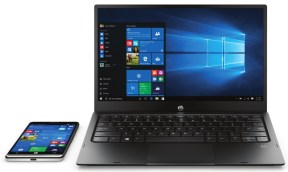
What? HP is getting back into the phone business? Again?? Really??? After that whole Palm/Web OS thing???? Well, sorta.
No, they’re not trying to get back into the consumer phone business, at least not yet, but they did introduce a new phone and related accessories that are an interesting concept for businesses looking to reduce the cost of arming employees with mobile devices.
But with the whole BYOD, “Bring Your Own Device” thing, where employees can use their personal phone or tablet for work, don’t you have to win in the consumer space first?
Well, maybe not.
BYOD has been a major shift that has had huge impacts on both the device world and the business world. But for many businesses that still want to minimize the costs that supporting the wide range of devices the IT department might be asked to manage, they’ve taken a different approach. They’ve simply said fine, we can no longer foist a crappy, low-end phone on employee’s so here, here’s an expensive iPhone or Android Phone, and an expensive laptop to keep them productive (and happy), but at least we can simplify some of the cost and complexity.
Will HP succeed here? I don’t know, but let’s break this down and look at what they’re actually doing here.
What Did They Introduce?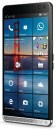
- The x3: A nicely designed, solidly built (I’m guessing, but it is HP), fairly powerful phone, that will not be offered for purchase to end consumers.
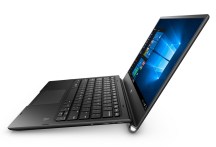 The x3 Mobile Extender: The WHAT??? Ok, ignore the name, but focus instead on what it is; a super thin, light, laptop-ish sized screen/keyboard/trackpad combo that has no processor/memory/hard drive itself, but extends the power of the x3 phone to a laptop sized experience via a feature in Windows 10 called Continuum.
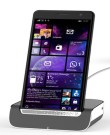
- The x3 Desk Dock: A docking cradle for the x3 that provides a wired connection to a monitor and keyboard that extends the power of the x3 phone to a desktop like experience via a feature in Windows 10 called Continuum.
Why Would Anyone Buy This?
When I first saw this I thought “kinda interesting, but if I’m going to carry two devices (a phone and a screen/keyboard) I want them both to be functional devices that I can use separately or, if I want, together, but a “laptop” (the Extender) with no on-board processing power or storage makes no sense to me”.
Then it dawned on me, this device is NOT intended for me, an end-consumer. It’s intended for businesses that want to arm a mobile sales force but don’t want to have to give employees both a $600 phone and a $1,000+ laptop.
Why? because that’s $1,600 – $2,000+ worth of equipment that can be lost, stolen or broken and the IT department now needs to configure, deploy, secure and manage two computing devices for every employee.
What if there is a simpler, more cost effective way to give mobile employees the capabilities they need at a greatly reduced cost and simplified management?
But Can a “Phone” Really Do Both Phone and Laptop Stuff?
In the case of Windows 10, the answer is, well, yes, for many companies and scenarios.
Microsoft has enabled two key things: Continuum which, as described above, lets a phone or tablet take advantage of and act appropriately when connected to a larger screen/keyboard, and Universal Applications, which means a single app can be written that can run across phones, tablets, laptops and desktops (with a few tweaks to optimize it for a specific screen size). That app can in essence sense what kind of setting it’s running on, and function in the way that makes sense for that particular device.
An example of this are the new versions of Microsoft Office applications. For instance, the Word program when run on a phone presents a simplified, touch-centric interface with the expectation that if you’re reviewing a document on your phone you want to do more simplified actions. But, if you need to do some more extensive work, and connect it to say the Extender, where you now have a laptop sized screen and keyboard, Word will look and act like you’d expect it to on a laptop/desktop including supporting a trackpad/mouse, even though it’s actually running on the phone.
So, is this some silver bullet for HP? No. But it is a pretty compelling scenario for businesses looking to make their traveling workers as productive as possible with a more efficient way to manage the cost and complexity. And I, for one, will be watching this with interest.

 clarkb...
Continuum on Windows Phone is interesting but has some big holes. The biggest being the inability to run “regular” Windows apps and the lack of Java support. It only runs Windows “modern” apps and browser based apps that don’t require plug-ins. I’m sure there are some scenarios where it would work but it’s just too limited today. Great concept, but lack of execution and lack of apps is holding it back.
Indeed, is it full-blown Windows 10? No, but for a mobile workforce that relies on std apps like email/Outlook, Office, etc it definitely has a compelling value prop.