
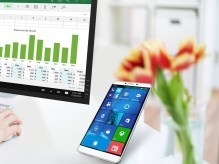
 Nowhere is the power of Windows 10 Continuum more visible than when you connect your phone to a large screen with a mouse and keyboard and it looks, acts and feels like your working on a full PC. It truly is a magical experience, but begs the question “is this something I would use frequently?”.
Windows 10 Continuum is a very useful feature that lets a device adapt to various screen sizes, from phone to desktop, and various input methods, from touch to mouse and keyboard, so your device can morph based on how it’s being used. (See below for more info on Continuum).
For tablets/2-in-1’s this feature is extremely useful on a daily basis as you shift back and forth between tablet mode and laptop mode. Fold back or detach the keyboard? you get a touch based interface. Re-attach the keyboard? you get a laptop/desktop interface much better suited for the keyboard and touchpad/mouse.
Things get more interesting with a Windows 10 phone connected to a large screen. In this scenario, the phone is powering the screen and acting like a laptop, while the phone stuff including apps, tiles, etc, stay displayed on the phone. You can make/take calls etc on your phone, while working on say a Word or Excel document on the larger screen. And, if you don’t have a mouse, the phone actually acts as a touch track pad for the larger screen.
Pretty cool stuff, so how well does it work?
I took a quick trip to Montana 2 weeks ago and decided to pack light and not bring my laptop/2-in-1. It was a little experiment to see if you really could leave your bigger devices at home and live with a phone only, but also be able to do “real work” on a bigger screen, like the TV in the hotel room, if needed.
Plus, I’m a worrier, and I always question what to do with my electronics when I travel, especially on a trip like this, where we were going to be away from the hotel and the car for extended periods of time and it was nice not to have to worry about a 2-in-1 laptop.
And I have to say, it was a pretty compelling experience. When I was out and about I had my phone with me, but when I was back at the room I connected wirelessly to the TV and could do email, etc on a big screen and full sized keyboard. And I was really amazed at how much it felt like I was working on a full sized PC.
As noted above, Continuum is much more than simply casting or displaying a mirror image from your phone or tablet to a larger screen. It actually looks and acts different on the larger screen, more like a separate desktop or laptop, and it feels amazing this is all being powered by a phone.
So, if this was such a compelling experience, why do I ask the question “is this really something I would use frequently?”.
Well, there are couple of reasons:
First, while “packing light” meant I didn’t pack my laptop/2-in-1, I still packed a Bluetooth keyboard, a Bluetooth mouse, and an HDMI “stick” to allow me to connect wirelessly to the hotels TV. And if you’re going to be carrying a keyboard, mouse and HDMI dongle, you might as well just toss in your tablet or 2-in-1. And, in actuality, I did also packed my Nexus 7 Android tablet because it’s an awesome consumption device, so I wasn’t really packing all that light.
Second, while it was nice having a larger screen to work on, the screen (TV) is on the dresser or wall, not on the desk, so you have to do some re-arranging for a comfortable work environment. Plus, I like having the TV on while I’m doing email, etc so dedicating it as a PC screen was a problem, especially considering my son and I were sharing the room and he certainly didn’t want to watch me type emails.
I can think of potential home scenarios where this might be more useful, like a spare bedroom where you might have a TV, and you could leave a mouse and keyboard there and use it with your phone as a spare PC. But in reality, most Americans have a 1:1 or higher ratio of tablets/laptops/PCs per person so it’s not really a need, and any guests staying with you most likely have their own tablet or laptop with them.
And maybe there’s a fit for under-developed countries where their phones really are their only “PC’s”. But then you still have the problem of everyone else in the house loosing the ability to watch TV while one person uses it as their PC screen.
There’s also the promise of a simpler, less costly way for businesses to arm their mobile workers with phones and a dumb, cheap keyboard/screen clamshell like the HP Elite x3 I’ve written about previously.
But for the average consumer, at least for the common hardware and use cases today, I don’t see this as something that has much use.
A cool demo? Something to make a geek smile a little? Yes, but not really something an average consumer would use.
More on Continuum:
As I noted above, Windows 10 Continuum is a very useful feature that lets a device adapt to various screen sizes.
A simple example is something like a tablet/laptop hybrid, 2-in-1 type device. These larger, touch screen devices promise the convenience of a tablet, with the ability to do real work.
With Windows 10’s Continuum feature, when you have the keyboard attached, with integrated track-pad, or optionally a Bluetooth mouse, your device works like you’d expect from a laptop, with a Windows desktop, Start button/menu, etc. But, disconnect the keyboard and mouse, and the screen switches to a much more touch based interface, which is really the Start Menu blown up with large, touch-based tiles.

 clarkb...